TrackStudents
Stop trying to remember. Start documenting.
Daily grades, behavior, support and out-of-room activity documented in seconds — then turned into timelines and reports schools can actually use.
Who it's for
- Teachers
- Administrators
- Instructional Assistants
- Learning Support
- PCAs
Problems it solves
- •Teachers rely on memory for what happened weeks ago.
- •Behavior, support and grades live in different notebooks and spreadsheets.
- •Administrators see incidents, not patterns.
Key features
What TrackStudents does
Daily grading & participation
Scored CTE daily grades or tracking-only regular education models.
Behavior & positive documentation
Redirections, positives, academic and support entries kept in separate categories.
Student Kiosk
Students sign themselves out; teachers see who is out and for how long.
Support staff & PCA
Assignment-based access so support staff see only their assigned students.
Special Education support
IEP/504 designation, goals, accommodations and support documentation.
Timelines & reports
Student timelines, date-range reports and schoolwide patterns for administrators.
Staff-generated parent reports
Staff create parent-facing reports from documented entries.
Program tracking
Specialized tracking such as Cosmetology Hours where a school enables it.
How it works
Step by step
- 1
Set up the school
An administrator creates the school workspace, adds classes and invites staff with the right role.
- 2
Choose a class model
Scored CTE daily grades, or tracking-only documentation for elementary, middle and high-school classes.
- 3
Document in seconds
Teachers and assigned support staff log academic, engagement, behavior, support and positive entries during class.
- 4
Students use the kiosk
Students sign themselves out for the bathroom, nurse, office or guidance; return times are recorded automatically.
- 5
Review the evidence
Student timelines, date-range reports and schoolwide patterns turn daily entries into usable evidence.
Classroom workflows
Daily grades or tracking-only documentation, with separate academic, engagement, behavior, support and positive categories.
Student Kiosk
A limited student-facing screen: bathroom availability, sign-out reasons, a live view of who is out, and overdue alerts.
Support staff
Instructional Assistants, Learning Support and PCAs document only the students assigned to them.
Special Education
IEP/504 designation, goals, accommodations and a daily-use Plan Summary — not a replacement for the full IEP.
Concern → support → outcome
Concerns lead to documented supports, and outcomes show which interventions actually helped.
Administrator oversight
Schoolwide trends and patterns across classes, without reading every entry.
Example workflow
Example: a welding teacher (fictional)
- 1.Opens the class and marks today's daily grades for 20 students.
- 2.Logs a positive entry for Jane D. and a redirection for John D. in two taps each.
- 3.Sees on the kiosk that Alex S. has been out 12 minutes and gets an overdue alert.
- 4.At conference time, prints Jordan T.'s six-week timeline instead of guessing.
Illustration only — names and programs are made up.
IT & security
At a glance
- ✓Staff sign in; students never sign in to the staff application.
- ✓Access is limited by role, class and student assignment — a PCA sees only assigned students.
- ✓Each school has its own workspace; demo data is kept separate.
- ✓Student data is not sold and not used to train AI models.
Guided tour
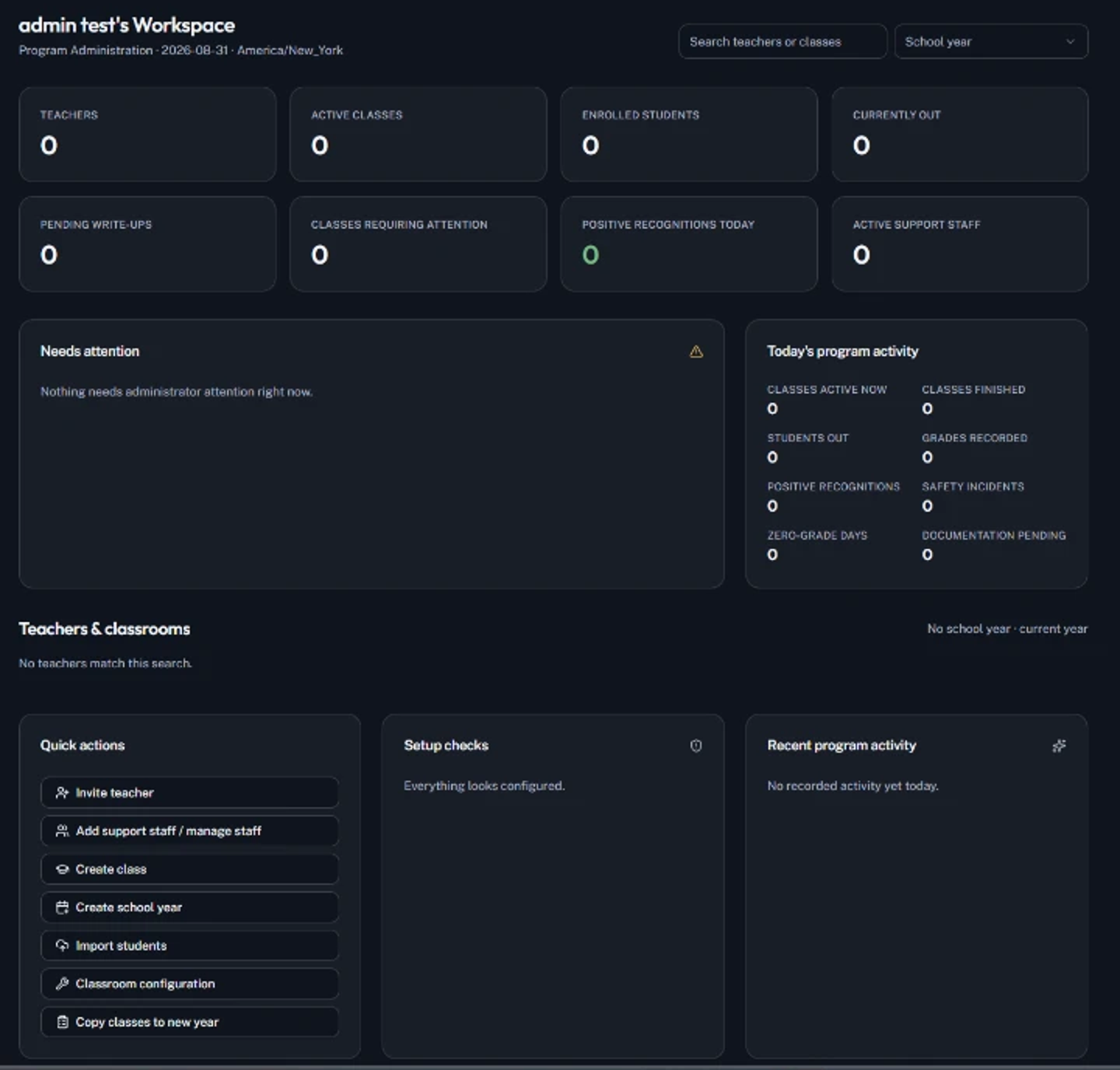
Explore TrackStudents screen by screen
Connection status
TrackStudents provides school identity and membership for supported PaperGrade and SkillProof access. No universal single sign-on or automatic grade synchronization.
Purchasing
Available to individual educators, and to schools through TrackStudents institutional subscriptions.
See pricing →Demonstration
See TrackStudents in action
Open an approved presentation, or ask for a live walkthrough with your team.
TrackStudents · How It Works
TrackStudents: How It Works
School setup, classrooms, daily documentation, Student Kiosk, Special Education and PCA support, and reports.
23 slides · about 15 min (approximate) · For: Principal, Teacher, CTE Director, Superintendent
TrackStudents · Technical Architecture
TrackStudents: Systems Architecture
Access roles, workspace separation, encryption, data minimization and integrations for school IT.
20 slides · about 15 min (approximate) · For: IT Director, Superintendent, Purchasing Department
TrackStudents · Schoolwide Implementation
TrackStudents: School Administration
Onboarding, oversight, roles, support staff, reports and a phased rollout for school leaders.
22 slides · about 15 min (approximate) · For: Principal, Superintendent, CTE Director
TrackStudents · Workflows
TrackStudents: Teacher Workflows
A teacher's day: classroom setup, kiosk, quick documentation, grading and reports.
19 slides · about 15 min (approximate) · For: Teacher, Principal